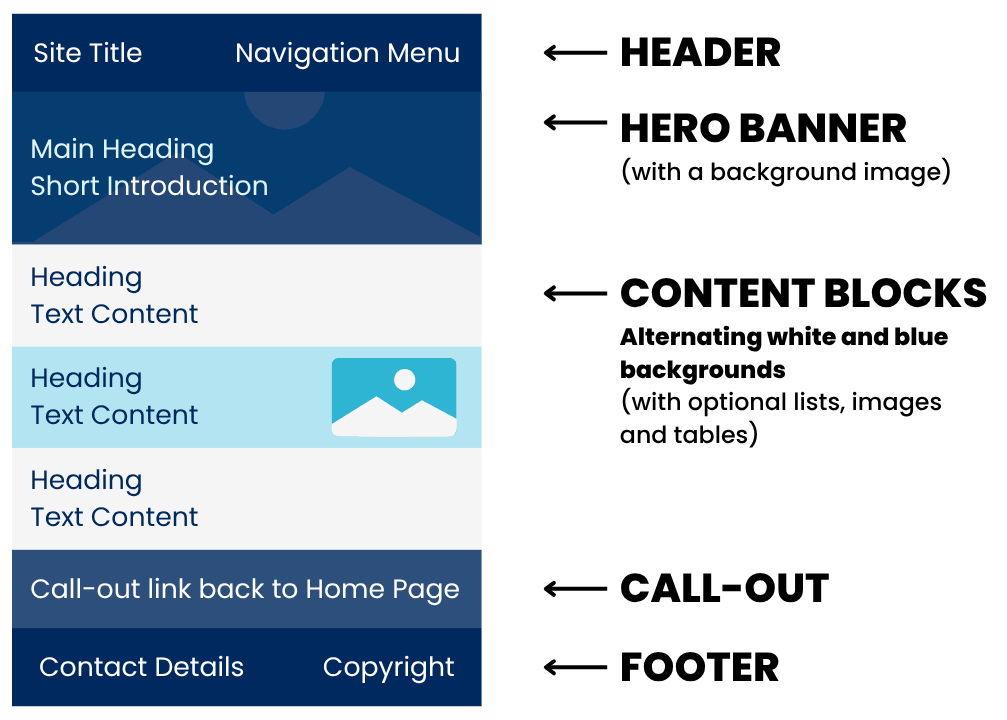
I have used a range of CSS styles that range from class, ID and element selectors. I also use a descendant combinator selector type, which selects a certain element within a class (e.g. changing the h2 element, only for the cta class). While there are a lot of CSS Styles, this allows me to design each element carefully, giving me no restrictions on how it looks. Below is a summary of each selector, the type of selector, what the style does and where it was used.
| Selector |
Type of Selector |
What the style does |
Where it's used |
| .container |
class |
Applies 70% width, centres the container horizontally and applies 0 margins |
For each block of content, creating a gap from the edge of the page and the content |
| .grey-block |
class |
Applies a light blue background and 30px top and bottom padding |
For the blocks of main content to apply a visual break |
| .white-block |
class |
Applies a white background and 30px top and bottom padding |
For the blocks of main content to apply a visual break |
| .header |
class |
Applies a dark blue background with a 20px padding on the top and bottom |
For the navigation block at the top of each page |
| .main-block |
class |
Applies a 100px top and bottom padding, with a white foreground colour. It applies how the background will be seen: no repeats in the image and with a size set to 'cover' so there is no extra space |
For each of the hero banner blocks on each page |
| #main |
ID |
Applies a background of an image with a gradient overlay |
Only for the hero banner block on the Home Page |
| #past |
ID |
Applies a background of an image with a gradient overlay |
Only for the hero banner block on the 'My Past' Page |
| #future |
ID |
Applies a background of an image with a gradient overlay |
Only for the hero banner block on the 'My Future' Page |
| #comments |
ID |
Applies a background of an image with a gradient overlay |
Only for the hero banner block on the 'Comments' Page |
| .half |
class |
Applies a flex layout, vertically centres the items, spaces them across the row using space-between, and adds a 20px gap between them. |
For the content blocks which have two objects next to each other |
| .cta |
class |
Applies a dark blue background, with a 20px top and bottom padding |
For the callout blocks at the bottom of the pages to link back to the Home Page |
| .footer |
class |
To set a dark grey background with a 20px top and bottom padding, and applying a white colour on the foreground object (the text) |
For the footers at the bottom of all pages |
| img |
element |
Applies a 20px margin to the right and left, sets the max width to 100% and adds a box shadow |
For all images (excluding background images) |
| #profile-img |
ID |
Sets the max width to 25% |
For the profile picture of Jia on the Home Page |
| #palette-img |
ID |
Sets the max width to 75% |
For the picture of the colour palette used near the bottom of the Comments Page |
| #computer-img |
ID |
Sets the max width to 45% |
For the picture of technologies' uses near the bottom of My Future Page |
| #internal-layout-img |
ID |
Sets the max width to 40% |
For the picture of the internal layout diagram near the top of the Comments Page |
| body |
element |
- Applies a 0 padding and margin, to remove extra white space
- Applies 'Gill Sans', 'Gill Sans MT', Calibri, 'Trebuchet MS', sans-serif font style to all text
- Makes the text height to 150% for all text
- Sets the colour of all text to dark grey (so it's not a harsh black)
|
To define a consistent style for the entire content of all pages |
| h1 |
element |
Sets font size to 35px, changes colour to white and increases line height to 150% |
For the headings in the hero main block on all pages |
| h2 |
element |
Sets font size to 20px and changes colour to dark blue |
For the headings of each content block |
| b |
element |
Applies a font weight of 600 |
For all text that is bold |
| a |
element |
Applies a color of dark blue and a font weight of 600 |
For all text that has a link with the <a> tag |
| span |
element |
Applies a color of light blue |
For the span text in Home Page |
| .menu |
class |
Arranges the text items in a single row, with a 40px gap in between, and aligns it to the right |
For the text in the header block at the top of each page |
| .menu a |
descendant combinator |
Changes the text colour to light blue with no text decoration (no underline) |
The links with <a> tag in the header block at the top of each page |
| .header_current |
class |
Changes the text colour to white, with a 700 font weight and no text decoration (no underline) |
Applied to the current page link in the menu. (e.g. if the user is on the Home Page, then this class styling is applied to the Home Page link in the navigation) |
| .cta h2 |
descendant combinator |
Makes the text colour light blue (instead of dark blue) |
In the h2 text in the callout block at the bottom of each page, which has a dark blue background |
| .cta_link |
class |
Makes the link coloured to white |
In the callout block at the bottom of each page, which has a dark blue background |
| ul |
element |
Removes all margin on the top and bottom |
For all unordered lists |
| ol |
element |
Removes all margin on the top and bottom |
For all ordered lists |
| table |
element |
Removes distance between cells so the borders are adjacent to each other |
For styling applied to the entire table |
| th |
element |
- Applies padding of 10px on top and bottom, and 20px on left and right.
- Makes the text left aligned.
- Adds a thick bottom border, defines dark blue text colour and applies a light blue background colour.
|
For the header row of this table |
| td |
element |
Applies padding of 10px on top and bottom, and 20px on left and right. Adds a small dark blue bottom border |
For the data rows of this table |
| #col_one |
ID |
Sets width to 10% |
Only for the first column in the table |
| #col_two |
ID |
Sets width to 10% |
Only for the second column in the table |
| #col_three |
ID |
Sets width to 40% |
Only for the third column in the table |
| #col_four |
ID |
Sets width to 40% |
Only for the fourth column in the table |